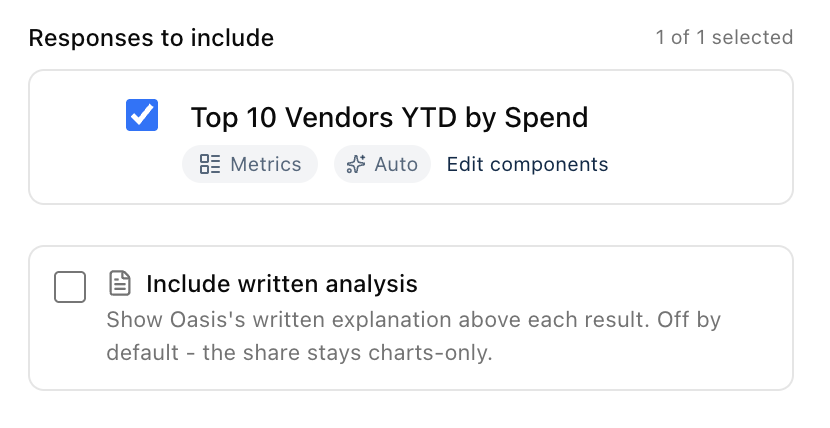
When you share a result, you can now include Oasis's written explanation alongside the charts and tables, not just the numbers on their own. Until now a shared link showed only the visuals, so whoever you sent it to saw the chart but lost the part that explained what it meant.
Look for the new 'Include written analysis' checkbox in the share window. It is off by default, so your shares stay clean and chart-only unless you decide otherwise. Turn it on and the explanation appears above each result, and the live preview shows you exactly what the recipient will see before you create the link.
If a result has no written explanation to include, the checkbox simply tells you so, so there is never any guesswork about what will be in the shared view.
New Cost Breakdowns, Sharper Numbers, and a Smoother Chat
You can now ask for the average cost of a plan or option across the homes that have it, like 'average cabinet cost per house for the Gallatin plan.' Oasis pulls the cost for every home with that plan or option and gives you the average, the total, and a per-house breakdown.
Purchase order cost totals were being over-counted in some breakdowns when a single PO was split across multiple lines, which inflated the numbers. Those totals are now correct.
When Oasis suggests tracking a result to a dashboard, that button now saves the full result to your board instead of a blank tile.
Questions about what is true right now, like 'how many homes are available for sale right now,' no longer get stuck; Oasis answers them directly.
Multi-part questions come back faster: Oasis runs independent lookups at the same time instead of one after another, and skips setup work it does not need.
Fixed several cases where a valid question would quietly retry itself before answering, so more answers come back on the first try.
Faster Spec Books and a More Dependable Chat
Oasis was unavailable twice on June 10. We found and fixed the root cause: a slow database lookup that, when it was cancelled, could quietly jam the whole app until someone restarted it. The app now cancels slow lookups cleanly, and if it ever gets stuck like that again it restarts itself instead of waiting for a person to notice.
Spec books are dramatically faster. The selections lookup behind the spec book was timing out every single time, which slowed the book down and could leave the color selections incomplete. That lookup now finishes in under a second, so the book builds quickly with the full selections data.
While Oasis works on your question, you now see what it is actually doing, like 'Reading your question' or 'Putting the report together', along with how long it has been at it, instead of a bare 'Thinking' that sits there for a minute on big reports.
Some answers were finishing but never showing up, leaving the chat stuck on 'Thinking' until you refreshed the page. Oasis now notices when that happens and brings the finished answer into the chat on its own.
Small touch: clicking + to start a new chat now puts the cursor straight in the question box so you can just start typing.
Ask for a Client-Ready Spec Book
You can now ask Oasis for a spec book in plain words, like 'create a spec book for the Allen job,' and get the full client selections specification book: project summary, price summary, deposit schedule, every selection organized by section (exterior, interior finishes, flooring, tile, cabinets, plumbing, appliances, lighting), the addendum options, and an Outstanding Items page listing what still needs a decision. The format follows the spec books the selections team already produces by hand, so there is no need to attach an example or describe the layout.
Items on the color sheet that say 'See Options' are now matched up with the addendum option that fulfills them, so the book shows the actual product the buyer purchased instead of a placeholder. Anything that could not be confidently matched goes on the Outstanding Items page rather than being guessed at.
Spec books work for jobs at any stage, including homes that have not started construction yet, which is when the selections team needs them most. The Outstanding page also knows the difference between a selection that was forgotten and a room the plan simply does not have, so the action list stays short and real.
If Oasis cannot tell which job you mean (a common last name, for example), it asks instead of guessing. And when you mention a file you shared in an older conversation, Oasis now tells you it cannot see files from other conversations and asks you to attach it again, instead of quietly producing something different from what you expected.
See the Pictures From the Standards Book
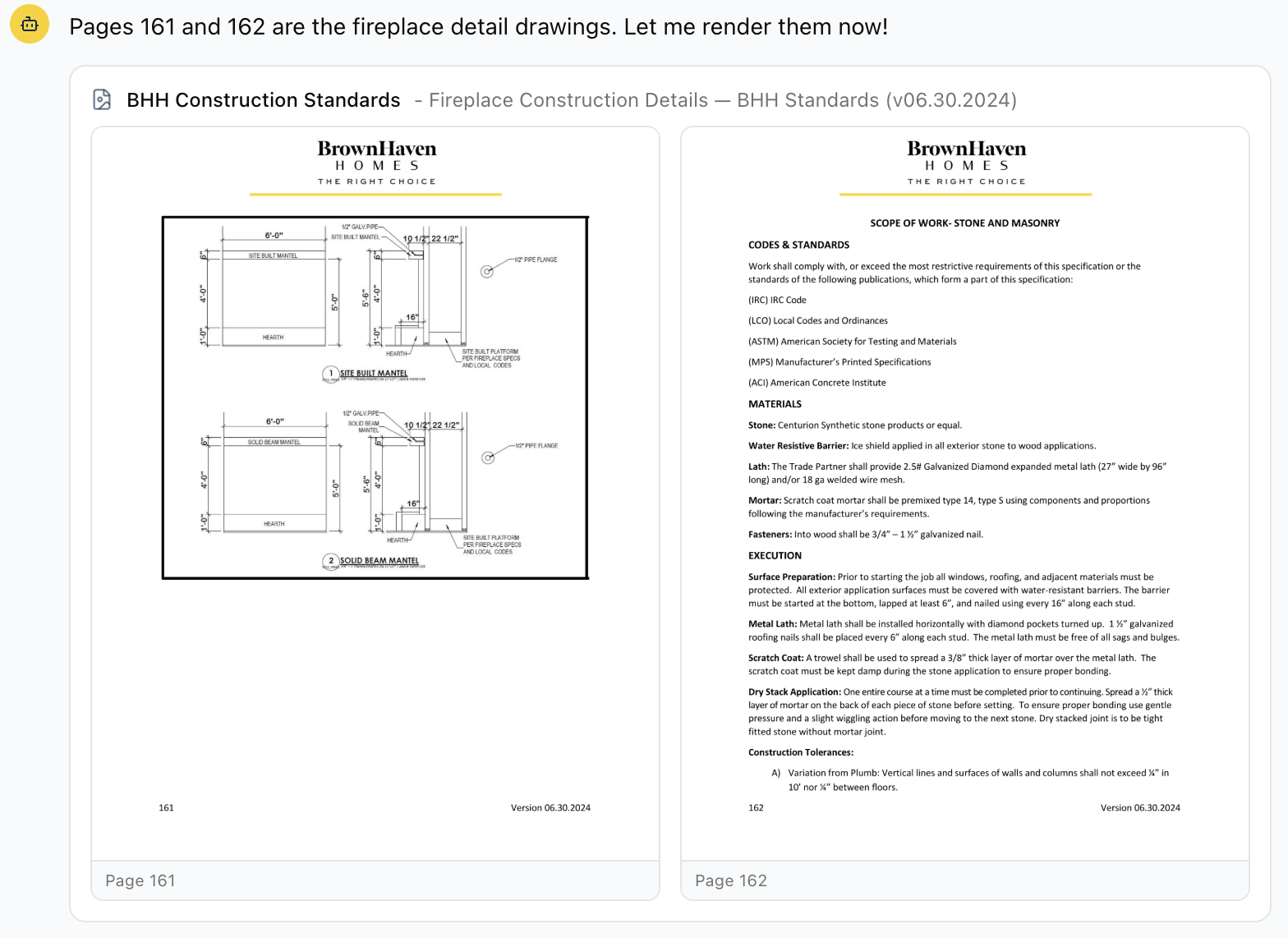
Oasis can now show you the actual pages of the Construction Standards book, pictures included. Ask to see the fireplace detail, a footing drawing, or any other diagram and the original page appears right in the chat, exactly as it looks in the book. Click a page to open it full size in a new tab.
Before this, Oasis could only read the words in the standards book. The detail drawings at the end of each chapter have no words to read, so when you asked for a picture it had to tell you it couldn't show one. Those drawings are a big part of what the book is for, so now it shows you the page itself instead.
This works across the whole standards book, every chapter's detail pages, and applies to the other reference documents loaded into Oasis as well.
Ask Oasis About HubSpot, Asana, and Avid
Oasis can now answer questions about three new sources alongside Mark Systems: your HubSpot sales contacts and deals, your Asana projects and tasks, and your Avid homebuyer satisfaction surveys. Ask things like 'how many HubSpot deals do we have by stage,' 'how many Asana tasks are still open by office,' or 'which recently settled homes have not responded to their Avid survey.'
You can cross-reference the new sources against Mark Systems in a single question. For example, match HubSpot contacts to Mark Systems prospects by email to see how many have converted to a home, or tie an Avid survey back to the settled home and community it belongs to. Oasis works out how the records line up, and tells you plainly when two sources cannot be matched reliably instead of guessing.
The new data is kept current on a schedule, and each refresh pulls only the records that changed so it stays quick. As with everything in Oasis, these sources are read-only, so nothing you ask changes anything in HubSpot, Asana, or Avid.
Selections Reviews That Catch the Real Gaps
Oasis no longer reports 'no color selections' for a job whose selections are already loaded. Mark Systems keeps a buyer's color and style choices in two places and copies them from one to the other a little while after they are entered. Oasis was sometimes reading the copy before it caught up, so a selections review or spec book could come back empty even though the selections were in. It now reads both places, so a choice shows up as soon as it is entered.
Missing-selections lists now point you at the gaps that matter. Every job carries a long list of possible selection slots, and most never apply to a given plan, so flagging every blank buried the few that were truly forgotten. Oasis now marks a blank that sits among other filled choices in the same area as a likely gap to handle first, and treats a whole area that is blank as more likely to simply not apply to that plan. A new 'Likely Gaps' count gives you the short list at a glance.
Oasis now applies Brown Haven's selection rules when reviewing a job, so it can tell which blanks are genuinely required from the ones that depend on what the buyer chose (for example, porch post paint only when wrapped columns were purchased, or terrace flex flooring only with a finished terrace). The same option-aware check looks in both places options are stored, so nothing is missed while a job is still being set up.
Open Warranty Counts Now Match Bilt
Open warranty numbers now line up with Bilt. When you asked about open warranty work, by office, by community, or company-wide, Oasis was reading the wrong part of Mark Systems and counting only the service orders that had been dispatched to a vendor. That left whole offices looking nearly empty (Clemson, Dawsonville, and Oconee were badly undercounted, and several jobs were missing entirely) while others looked too high.
Oasis now counts a warranty request the same way Bilt does, one per service issue, using the live open/closed status. We checked the new numbers against your current Bilt list office by office and they match (for example Asheville, Sylva, Dawsonville, Clemson, and Oconee all line up).
This affects open and backlog questions only. Warranty cost and spend figures were always correct and are unchanged.
A 'Try Again' Button When an Answer Doesn't Come Through
When a question fails to come back even after Oasis tries again on its own, you now get a 'Try again' button to resend it with one click, instead of a message telling you to wait a few minutes. Your question is kept, so nothing is lost.
Fixed a freeze that could happen while working in a shared conversation. Asking a question no longer locks up the page mid-answer.
Reports that turn up no matching records (for example, a filter that no vendor or category matches) now come back as a clean empty result instead of erroring out.
Pin Conversations, and Questions From the Oasis Team
You can now pin a conversation to keep it at the top of your list. Hover over any conversation in the sidebar and click the pin icon. Pinned conversations stay up top under a 'Pinned' heading, so the ones you come back to often are always right there instead of getting pushed down as you ask new questions.
The Oasis team can now ask you a question right inside the app. When we need something only you would know, like confirming a construction standard or how a particular number should be read, it shows up at the top of your list with an 'Oasis Question' badge and stays pinned there until you answer. Open it, reply in your own words, and it drops back into your normal list once you have responded.
Ask Oasis About Building Code
Oasis can now answer common building-code questions. Ask something like 'what does code require for receptacles on a kitchen island?' or 'do offices need fan bracing?' and it answers from a curated code reference and points you to the relevant code section, instead of saying it cannot help.
These answers are clearly marked as outside guidance. Oasis treats the code reference as general guidance to confirm against the code edition your jurisdiction has adopted and your local inspector, and keeps it separate from Brown Haven's own construction standards, so a code rule is never mistaken for a Brown Haven standard.
Truer Projections and Quicker Recovery
Multi-year projections now use your real numbers for years that have already closed. When you build a long-range P&L or cash-flow projection and give Oasis a target margin, it was applying that target to past years too, so a year that already closed could show a goal instead of what actually happened. Oasis now reports the booked actuals for any closed period, applies your assumptions only to future years, and labels each year as actual or projected so you can see which is which.
Follow-up questions no longer hang for a long time before giving up. In rare cases a deep follow-up in a long conversation could spin for almost two minutes and then fail with a vague message. Oasis now stops sooner and tells you clearly, so you can rephrase and try again without the long wait.
Work on a Conversation Together
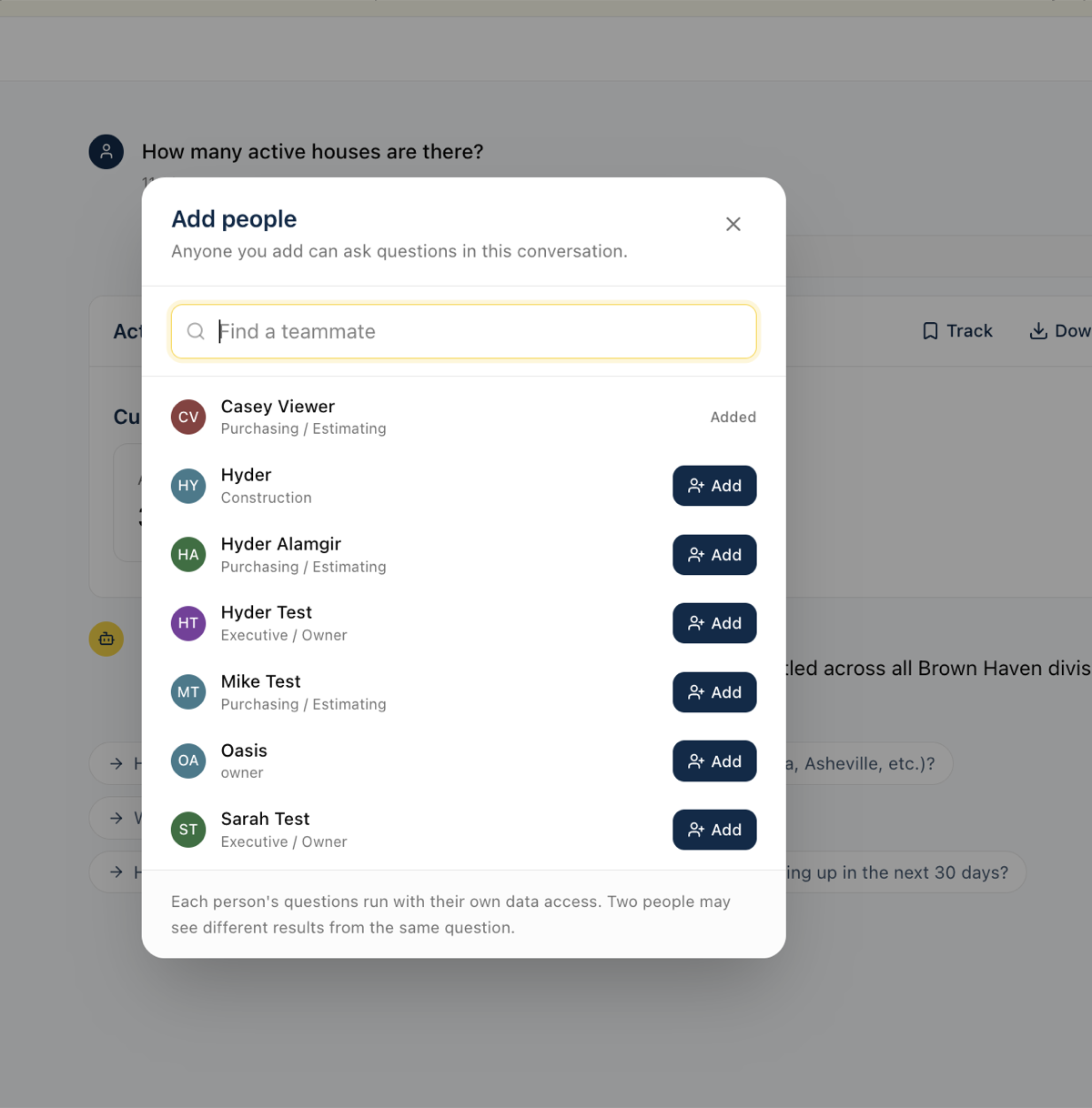
You can now bring teammates into a conversation and work a question out together. Use the new 'Add people' button at the top of any conversation to pick who you want; the conversation then shows up in their list too, and they can ask their own follow-up questions right alongside you.
Everyone sees the conversation update live. When a teammate asks something, their question and the answer appear in your view as they happen, and small avatars at the top show who is looking at the conversation with you right now.
Every question is labeled with who asked it and their role. Because each person's questions use their own data access, the same question can return different results for different people; the labels keep it clear who asked what, and a short note appears on an answer when someone's access left some data out.
Oasis answers one question at a time. If you ask while a teammate's question is still being answered, yours waits in line and sends automatically when the current one finishes. You can edit or cancel your waiting question any time before it sends.
Shared conversations are marked in your list, and a small dot appears when a teammate has added something new since you last opened it.
Only the person who started a conversation can add or remove people. Removing someone takes away their access but keeps their past questions in the history, so the record of who asked what stays intact.
More Accurate Numbers, CRM Data, and Faster Answers
Profit and margin now include land cost. Before, Oasis left the cost of the lot out of gross profit, which made margins look far higher than reality (a community could read about 56 percent when the true figure, with land included, was closer to 23 percent). It now always includes land cost, so profit and margin numbers can be trusted.
Oasis understands more of the names your team actually uses for communities. It now knows the nicknames and alternate names your team uses, so a question like 'cycle times for [community] Phase 2' gets answered right away instead of Oasis asking which community you mean or guessing wrong.
You can now ask about your CRM registrants and leads. Oasis reads your synced CRM data directly, so a question like 'how many registrants do we have' returns a real answer instead of Oasis saying it cannot reach your CRM.
Schedule answers no longer guess whether a home is ahead of or behind schedule. The meaning of a negative schedule number was being read inconsistently, so for now Oasis reports the plain variance and notes that the ahead-or-behind direction still needs to be confirmed, rather than stating it backwards.
Prospect and lead counts are more reliable. A date field that is blank on most records was quietly dropping the majority of prospects from year-to-date counts; Oasis now counts them correctly so the totals are not understated.
Answers are faster, and a few rough edges are gone. Month-by-month and date questions work on the first try more often, results render without needless retries, and Oasis no longer flags ordinary figures (like a phase name such as '1B') as if they were suspicious numbers.
Download Any Answer as a PDF
Every result Oasis shows now has a 'Download PDF' button in its header. Click it to save a clean, printable copy of that table, chart, or report, with an Oasis and company header and page numbers, ready to email, attach, or print.
Oasis now knows this is possible. If you ask for a PDF, a document, or 'a copy I can send over', it points you to the Download button instead of replying that it cannot create documents, which is what it used to do.
Each PDF carries a footer reminding everyone that the data is AI-generated and should be checked against source systems before it is used for financial reporting.
Cash Flow Forecast, On Demand
You can now ask Oasis for your cash flow forecast. Ask something like 'show me the 13-week cash flow' and you get a week-by-week table: cash coming in from home closings and bank construction-loan draws, and cash going out for construction, overhead, loan paybacks at closing, financing interest, and distributions, with a running cash balance carried forward each week.
It mirrors the manual Excel cash flow model, but builds itself from live data in your construction management system instead of the usual exports and hand calculations, so anyone can pull a current view on demand. You can look out as far as 52 weeks, and pin the forecast to a dashboard or share it like any other report.
This is a first version we are still validating with accounting, so treat it as directional for now. In particular, because your construction management system does not record a projected closing date, the forecast estimates each home's closing from its construction schedule.
Cleaner Tables and Faster Answers
Code columns no longer show up as dollar amounts. In tables like a purchase-order list or a cost breakdown, cost codes, PO numbers, and invoice numbers were sometimes formatted as money (a cost code of 365 reading as '$365.00', or an invoice number turning into a dollar figure). They now display as plain codes, so you no longer have to mentally translate them.
Answers come back faster when you mention a community, office, or division by name. Oasis now keeps a built-in directory of your communities, the office each one rolls up to, and the company it belongs to, so it no longer stops to look that up before answering. Questions like 'May sales in a given market' or 'handrail options for a community' get to the answer with less waiting.
Dashboard Tiles Stay Up to Date When You Refresh
Dashboard tiles now always show the latest numbers. Before, a tile built from a question like 'site authorizations this month' could get stuck on the day it was created and never move, no matter how many times you hit refresh, so a count that should have read 31 kept showing 28.
Time-based tiles now roll forward on their own. A tile you set up for the current month keeps counting through the end of the month and then rolls into the next month, instead of staying frozen on the month it was first added.
Refresh now actually re-runs the tile against current data. A behind-the-scenes mismatch meant some tiles silently failed to update (and a few errored out entirely); both are fixed.
If a refresh does fail, the tile now says so clearly with a 'Last refresh failed' notice and keeps showing the previous numbers, instead of looking like nothing happened.
The refresh spinner now keeps turning until the new numbers are actually on screen, so you can tell the update finished rather than wondering if your click registered.
Stuck or Blank Answers Now Recover Instead of Freezing
When the AI service has a brief hiccup, Oasis now shows a clear message and retries on its own, instead of leaving a blank reply that looked like the page had frozen. Your question is kept, so nothing is lost.
If a short connection problem happens while an answer is being written, Oasis can now route around it and still finish, where before the whole answer could fail.
Oasis no longer saves an empty reply when something goes wrong behind the scenes, so you will not find blank messages sitting in your conversation history.
Quicker, Cleaner Answers
Plain-text answers no longer get an extra, unwanted table tacked on. That also removes a roughly one-minute delay that used to happen on those replies.
Date-based questions (like 'last 12 months' or the number of days between two dates) work correctly on the first try more often, so you wait less.
When a calculation might accidentally double-count because it combined two sets of records, Oasis now catches it and corrects before answering, so totals are more trustworthy.
VPO 'SC Review' versus 'LO Discretion' breakdowns are now classified one consistent way (by cost code), so the same question gives the same numbers every time.
Construction Standards, Dashboards, and Page Fixes
Construction-standards lookups now reach the exact section you need even when a heading name (like 'Standards' or 'Execution') repeats across trades. Before, some questions dead-ended with 'I can't find that' even though the spec was in the booklet.
A dashboard tile that combines two different queries is now caught when you add it, instead of quietly showing the wrong numbers the next time it refreshes.
Metric cards now show 'No data' for an average when there are no matching records, instead of a misleading 0.
Fixed errors on the Vendors and What-If Scenarios pages so they load reliably.
What's New Shows Everything You Missed
The 'New in Oasis' banner now lists every update since you last checked, not just the most recent one. If several things shipped while you were away, you will see them all.
The banner stays on a single line so it takes up less room at the top of the screen, and the What's New page marks each update you have not seen yet with a 'New' tag.
See Who Added Each Tile
Every tile on a board now shows who tracked it, with a 'Tracked by' note in the tile footer next to the last-refreshed time. On a shared board you can tell at a glance which tiles are yours and who added the rest.
Remove a Single Tile From a Board
You can now remove one tracked tile from a board without deleting the whole board. Use the trash icon in the tile's header, next to the refresh button.
You can remove a tile if you own the board or if you are the one who tracked it, so you can take back something you added to a shared board without touching anyone else's tiles.
Removing a tile asks you to confirm first, and it only removes that one tile; the rest of the board stays intact.
Delete Boards You Created
If you created a board, you can now delete it yourself. Look for a Delete option on the board (both on your dashboards page and on the board's own page). Before this, only an administrator could remove a board, even one you made.
Deleting asks you to confirm first. If other people have added that board to their dashboards, the confirmation tells you how many, since deleting removes it for everyone, not just you.
You can only delete boards you created. Boards someone else made still show only an Unsubscribe option, which quietly removes the board from your own list without affecting anyone else.
Boards Now Refresh Themselves, and Refresh Reliably
Boards now update on their own. A board set to refresh daily updates every morning, and one set to weekly updates every Monday morning, without anyone clicking Refresh. Until now that schedule was only a label, so boards quietly went stale until someone refreshed them by hand.
Boards tied to a data sync now refresh automatically right after the latest data comes in, so what you see matches the freshly synced numbers.
Fixed a bug where refreshing certain tiles failed and left them showing an error. Tiles built from a chat result could lose track of their underlying data when refreshed; they now re-run their query correctly every time.
Tiles that can never display correctly are now caught when you add them, instead of being saved and then failing on every refresh.
Ask Questions About a Report Someone Shared With You
When someone shares a report link with you, you can now open your own copy and keep asking questions about it. Click 'Discuss this' on any shared view and Oasis hands you a private chat that starts from what was shared.
Your follow-up questions and the assistant's answers stay in your copy only. They do not change the original shared report, and the person who shared it does not see your questions.
The assistant already knows the context of what was shared, so you can jump straight to 'which item has the biggest difference?' or 'break this down by community' without re-explaining the report.
Better Link Previews for Shared Conversations
When you paste a shared conversation link into Slack, Teams, or a text message, the preview now shows that conversation's title and summary instead of the generic Oasis description. Whoever you send it to can tell what the link is about before they open it.
Opening a share link while signed out now shows the conversation's title and summary with a Sign in button, instead of dropping you on the home screen with no context.
Reliability and Query Accuracy Fixes
Error messages are now more descriptive when something goes wrong. Instead of a generic message, you will see what actually happened (provider connection dropped, response interrupted, etc.) along with the automatic retry countdown.
GL account lookups no longer crash when the account has zero activity in the lookback period. Previously, asking about an inactive GL account would show an error instead of showing zero balances.
Conversations that get stuck in a loading state now automatically recover. If a response fails to start, the conversation resets itself so you can try again without refreshing the page.
Date-based questions (like 'last 12 months' or 'cycle time in days') now work correctly on the first try more often. Previously, some date calculations needed a retry because of a syntax mismatch behind the scenes.
Purchase order queries involving house numbers or cost codes are faster and more accurate. The system now knows the correct way to link PO data to houses and cost categories without extra exploration steps.
Broader Model Support and Better Error Recovery
Oasis now works with a wider range of AI models. Previously, switching to certain models could cause responses to silently fail. Now the system handles model differences automatically so you always get an answer.
If a response fails to render after the data has already been fetched, Oasis now catches the problem and runs a recovery step instead of leaving you with a blank screen. You will see your data even when something goes wrong behind the scenes.
Every conversation turn now tracks which AI model produced it. This makes it easier to diagnose issues and compare model performance across different types of questions.
Faster Responses and Smarter Queries
Conversations are noticeably faster now. Oasis compacts earlier parts of the chat so the AI spends less time re-reading old results. Multi-turn sessions that used to slow down after 5-6 questions should stay snappy throughout.
Oasis now understands your company-specific terminology out of the box: completions (G02 orientation, not financial closing), COR codes (option codes starting with 9), site authorization stages (A08/A12), and the difference between divisions and the developments within them.
Date calculations and comparisons work correctly on the first try now. Previously, some date-related queries needed a retry because the AI used the wrong SQL function.
Count columns (completions, permits, starts, inspections) now display as whole numbers instead of sometimes showing dollar signs.
Every data table has a Download CSV button. If you ask for a spreadsheet, Oasis will point you to the download button on the table it renders.
Two new saved queries: GL Account Reconciliation (for month-end WIP audits) and Duplicate Payment Detection (flags same-vendor/same-amount payments in AP history).